This page was translated by an AI (LLM) with a cursory human check and is awaiting full review.
Using CMake
Presentation
CMake is a tool for automating the process of compiling and installing software. Like the autotools, it is a build automation tool aimed at simplifying the multi-platform compilation of source code.
In principle, to compile software using CMake, you just need to follow these steps:
mkdir build; cd build/ # création d'un répertoire temporaire pour la compilation
cmake ../src/          # équivalent du script ./configure des autotools
make                   # compilation
make install           # installation
Note that CMake also allows you to generate the configuration of Eclipse, Visual Studio, etc. projects.
CMake is part of a suite of software development tools developed by Kitware including CMake, CTest (software testing), CDash (continuous integration server) and CPack (software distribution).
Using CMake at IDRIS
CMake automatically detects the compilation environment, which can be problematic on IDRIS machines. Moreover, the CMake configuration files provided with the software are sometimes not written in a sufficiently portable way. This documentation explains how to use CMake at IDRIS, but you can also contact us at assist@idris.fr.
CMake Module
The different versions of CMake available on Jean Zay can be activated using the module command:
module avail cmake
 cmake/3.4.3   cmake/3.14.4  cmake/3.21.3  cmake/3.26.6
 cmake/3.11.2  cmake/3.18.0  cmake/3.25.2  cmake/3.31.4

module load cmake/3.31.4
Choosing Compilers
The Jean Zay machine uses Intel and NVIDIA/PGI compilers. By default, CMake will try to use the GNU compilers, which are also available on the machine. To avoid this, you need to specify the compilers to use. It is recommended to use environment variables (CC,...) rather than CMake variables (-DCMAKE_C_COMPILER,...).
See also: How do I use a different compiler? in the CMake FAQ
Each time you change the compiler, you must first completely delete the temporary directory used for compilation (build directory above) because the variables associated with the compilers can no longer be modified after the first execution of CMake.
See also: I change CMAKE_C_COMPILER in the GUI but it changes back [...] in the CMake FAQ
Thus, on Jean Zay, to change compilers and switch to Intel compilers, you need to run the following commands:
module load intel-compilers</version-desiree>
rm -rf build; mkdir build; cd build
CC=icc CXX=icpc cmake ../src/
Detecting Dependencies
CMake automatically detects the dependencies of the product to be installed. CMake uses internal recipes that describe how to find the dependencies. Recipe files can also be provided with the product to be installed. The names of the recipe files are of the form FindDEPENDANCE.cmake.
At IDRIS, dependencies are managed with the module tool. Modules directly add the paths to the headers and library files to the compiler arguments. They do not necessarily set the environment variables that CMake uses to find dependencies, which is why CMake does not always find the library paths.
When the dependency is already installed on the IDRIS machine, you can try loading the necessary modules for compilation before running CMake, but if this is not enough, you will need to help CMake find the libraries by setting CMake variables or adapting the recipe files.
Example:
cmake -DFFTW_INCLUDE_DIR=/path/to/FFTW/3.3.10/include -DFFTW_LIBRARY=/path/to/FFTW/3.3.10/lib ../src/
The command module show provides information on the installation paths of the modules provided by IDRIS. For the example above module show fftw/3.3.10
When the CMake variables are set, it is no longer necessary to load the corresponding module.
The names of the CMake variables depend on the products. They are often provided in the error message. Otherwise, you need to consult the cache, the CMakeLists.txt files or use the graphical interface to list the variables.
If the dependency is not available on the machine, you can install it on your account or contact us at assist@idris.fr. Similarly, contact us if you think an existing module can be improved.
Additional Information
Configuration Options
Compilation options are stored in CMake variables. These can be set on the command line using the -D option or using the graphical interface.
Example:
cmake -DCMAKE_C_FLAGS="-O3 -xAVX" ../src/
The list of CMake variables is available here but each product adds its own options. You need to consult the cache, the CMakeLists.txt files or use the graphical interface to list the variables.
Cache System
After running cmake for the first time, the compilation parameters are saved in the cache file CMakeCache.txt. It is possible to modify the configuration afterwards by running cmake again. On the first run, it is the source directory that must be passed as an argument to cmake. Then, you need to specify the temporary compilation directory:
cd build/
cmake -DCMAKE_CXX_FLAGS="-O3 -xAVX" .
After each modification, the configuration phase is replayed using the cache entries as initial values for the CMake variables.
As there can be complex logic between the compilation variables, it is sometimes less difficult to start from scratch when the first configuration phase goes wrong. In this case, you need to delete the directory and set the CMake variables directly on the command line.
Graphical Interface
The command ccmake provides access to the CMake curses interface. Like the cmake command, it takes a directory as a parameter.
cd build/
ccmake .
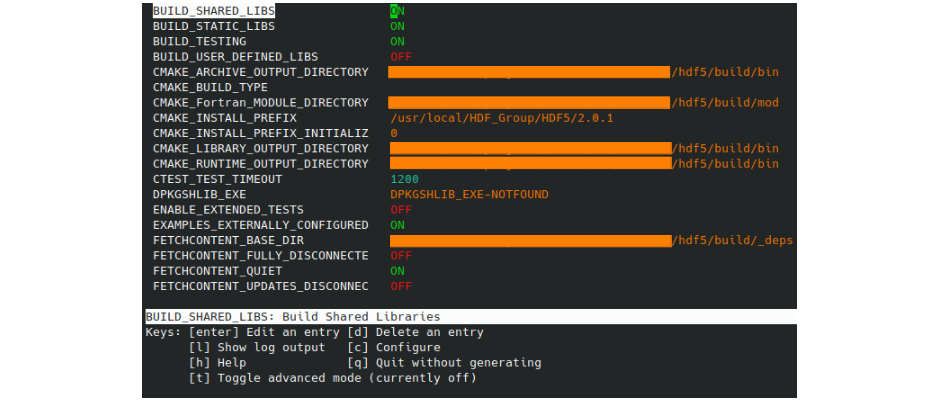
The interface displays all the CMake variables that influence the compilation. The variables can be modified and the Makefile files regenerated accordingly.
The available commands are listed at the bottom of the interface. To modify a variable, you need to position yourself on its line and press [Entrée]. Note that the description of the current variable is displayed at the bottom of the interface.
After modifying a variable, the configuration phase can be restarted using [c]. The interface displays the result and you need to press [e] to return to the menu. Note that the list of variables (or their values) may have been modified. [g] allows you to validate the modifications and exit the interface. [t] allows you to display the hidden variables.
Out-of-Source Compilation
CMake allows you to perform the compilation outside the directory containing the source files. This allows, among other things, not to pollute this directory, to easily delete the files generated by the compilation or to install several versions of a product from the same set of source files.
To use this feature, you just need to call the cmake command from a directory dedicated to the compilation (e.g. the build directory). The cmake command takes the path to the source directory as an argument.
Here is a classic example of organisation for various compilations (optimised, debug and sequential) with various compilation directories (build*) and their corresponding installation directories:
$ ls
  src/  build-optim/  install-optim/
        build-debug/  install-debug/
        build-seq/    install-seq/
$ cd build-seq; cmake ../src/
Choosing the Installation Directory
The CMake variable CMAKE_INSTALL_PREFIX allows you to choose the installation directory of the product. This is the equivalent of the --prefix option of the ./configure script of the autotools.
cmake -DCMAKE_INSTALL_PREFIX=../install/ ../src/
Compiler Options
Like most integrated development environments (IDEs), CMake allows you to manage a project with a compilation configuration adapted to developments (Debug mode) or to the production phase (Release).
The CMake variable CMAKE_BUILD_TYPE allows you to switch from one mode to the other. It is also possible to change the options of the compilers associated with these two compilation modes separately.
cmake -DCMAKE_BUILD_TYPE=Release \
      -DCMAKE_C_FLAGS_RELEASE="-O3 -xAVX" \
      -DCMAKE_CXX_FLAGS_RELEASE="-O3 -xAVX" \
      -DCMAKE_C_FLAGS_DEBUG="-g" \
      -DCMAKE_CXX_FLAGS_DEBUG="-g"
The options of the Intel compilers are detailed on the IDRIS website.
Displaying the Commands Executed by CMake During Compilation
Use the environment variable VERBOSE:
VERBOSE=1 make
Saving the Configuration
To facilitate the reinstallation of a product on a target machine, the simplest way is to keep a small script to replay the configuration phase.
CC=icc CXX=icpc cmake -DCMAKE_BUILD_TYPE:STRING=Release  \
                      -DCMAKE_INSTALL_PREFIX:PATH="$WORKDIR/opt/" \
                      -DCMAKE_CXX_FLAGS_RELEASE:STRING="-O3 -xAVX" \
                      -DCMAKE_C_FLAGS_RELEASE:STRING="-O3 -xAVX" \
                      ../src/
It is also possible to use the -C option of cmake to initialise the variables from a script written in the CMake language.
Note that CMake works with absolute paths, which does not allow directories to be moved after configuration.
See also: Why does CMake use full paths, or can I copy my build tree? in the CMake FAQ