This page was translated by an AI (LLM) with a cursory human check and is awaiting full review.
Database Management
There are several disk spaces on Jean Zay for storing your data. These disk spaces have different characteristics and are therefore more or less relevant depending on how you use your data.
This page presents some best practices for managing your databases on Jean Zay.
Reminder of Disk Space Characteristics
The characteristics of the different disk spaces are summarised in the diagram below and detailed on the Disk Spaces page of the documentation. A summary table is also provided there.
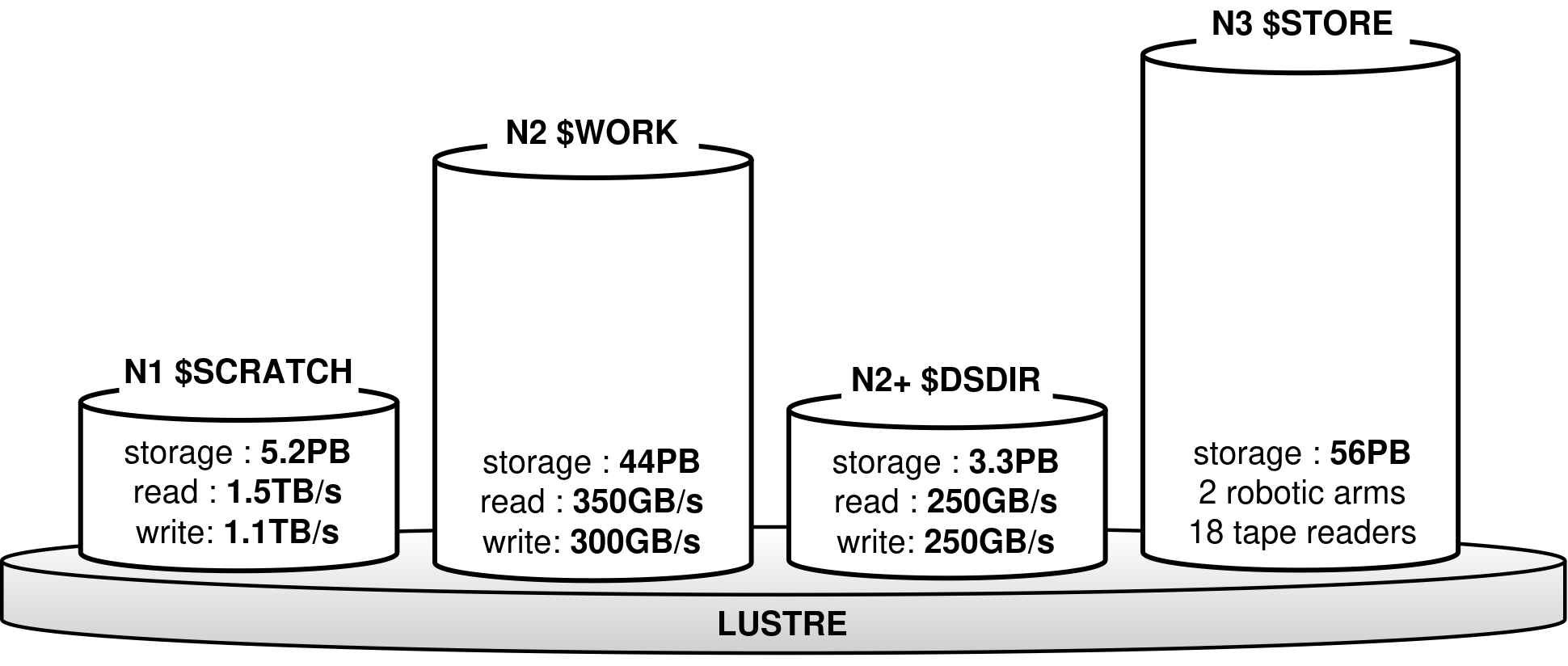 Reminder of Disk Space Characteristics
Best Practices
The DSDIR Reflex for Public Databases
If you are working on a public database (see the licence), we can download it for you in the shared disk space DSDIR. The data will be accessible to all users. This solution avoids saturating your disk spaces and pools resources.
This space offers the same performance as the WORK, namely a bandwidth of 350 GB/s for reading.
If your database is personal or under a too restrictive licence, you will have to manage it yourself on your project's disk spaces, as described in the following points.
Keep an Archived Copy in the STORE
Downloading a database can take a lot of resources (in computation and time). If you manage your database yourself, we recommend keeping a copy in archive form in the STORE (possibly in the WORK if it does not saturate the space).
WORK or SCRATCH?
During development or production, you can choose to place your database in the WORK or SCRATCH by considering the following advantages and disadvantages:
| WORK | SCRATCH |
|---|---|
| + Files are not subject to any automatic deletion procedure | - Files not accessed for 30 days are automatically deleted |
| - Bandwidth of 350 GB/s for reading and 300 GB/s for writing | + Bandwidth of 1.5 TB/s for reading and 1.1 TB/s for writing |
| - Quotas of 5 TB and 500 kinodes per project | + Very large security quotas (4.6 PB shared by all users) |
If you choose to store your database in the SCRATCH, it is even more important to keep an archived copy in the STORE. This way, you can easily restore data that might be automatically deleted by our SCRATCH cleaning procedure.
Contact Support in Case of Problems
If you encounter difficulties importing or managing your database on Jean Zay, IDRIS support is here to help: assist@idris.fr