This page was translated by an AI (LLM) with a cursory human check and is awaiting full review.
Disk spaces
For each project to which a user is attached, four distinct disk spaces are accessible (read/write) to the user: HOME, WORK, SCRATCH/JOBSCRATCH, and STORE.
An additional space, DSDIR, is read-accessible to all users and contains a set of databases and models for the Artificial Intelligence community.
Each space has specific characteristics adapted to its
use, which are described on this page. The access paths to these
spaces are stored in corresponding shell environment variables:
$HOME, $WORK, $SCRATCH, $JOBSCRATCH, $STORE and $DSDIR.
You can find out the occupation of the different disk spaces
with the IDRIS commands idr_quota_user and idr_quota_projet or the
Unix command du (disk usage).
- The return of the commands
idr_quota_userandidr_quota_projectis immediate but is not real-time information: the data is only updated once a day during the night. - The command
dureturns real-time information but its execution can take a long time depending on the size of the directory concerned. - The management of databases / datasets on Jean Zay requires following a specific procedure.
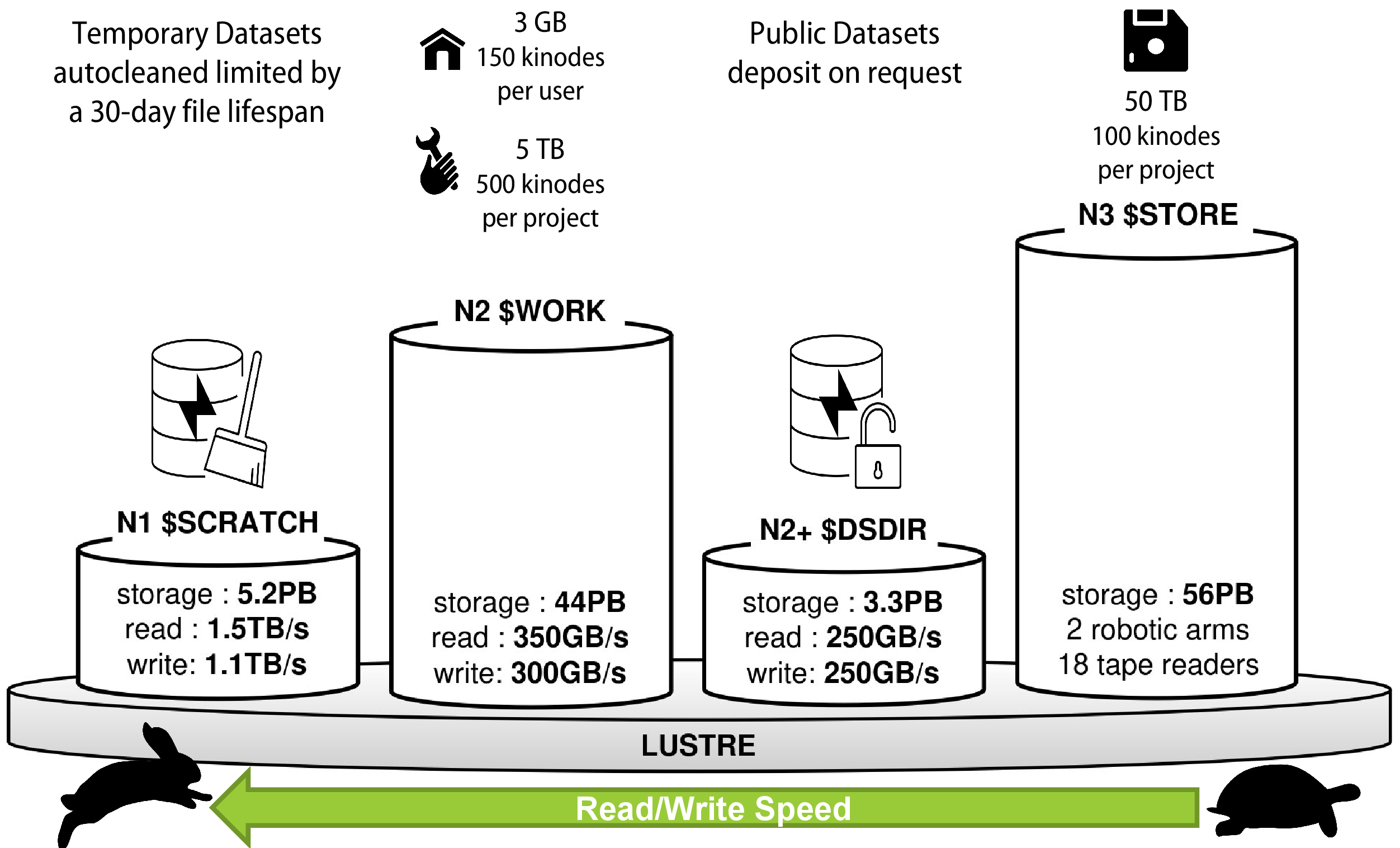 Jean Zay disk spaces
The table below summarises the main characteristics of the disk spaces. It is followed by detailed descriptions of each of them and a series of additional important remarks and characteristics.
Summary table of disk spaces
| Space | Default capacity | Specificities | Uses |
|---|---|---|---|
| HOME | 3 GB and 150 kinodes per user |
|
|
| WORK | 5 TB (*) and 500 kinodes per project |
|
|
| SCRATCH | Very large security quotas; 4.6 PB shared by all users |
|
|
| JOBSCRATCH | Identical to SCRATCH |
| Identical to SCRATCH |
| STORE | 50 TB (*) and 100 kinodes (*) per project |
|
|
| DSDIR | 3.3 PB in total for all users |
|
|
(*) project quotas can be increased on request from the project leader or their deputy via the Extranet interface or on request to User Support.
Detailed description of disk spaces
HOME
This is the home directory when logging in interactively. This space, specific to each user, is unique even in the case of a multi-project login and is regularly backed up. It is intended for small files that are very frequently used, such as shell environment files, utilities, possibly sources and libraries when their size is reasonable.
This space is deliberately limited by quotas per user, both in terms of volume (GB) and total number of files (inodes). It is accessible interactively or in a batch job via the variable $HOME:
cd $HOME# or simply:cdWORK
This is a workspace and storage space, usable interactively and in batch, and not backed up. It is generally used to store large files that are used during batch executions: large source files and libraries, data files, executables, result files, submission scripts, etc.
The WORK is a disk space limited by quotas per project, both in terms of volume (GB) and total number of files (inodes). It offers a bandwidth of about 300 GB/s for writing and reading. This can be temporarily saturated in case of exceptionally intensive use. It can be accessed by the command:
cd $WORK- Batch jobs can run in the WORK; however, several of your jobs may run at the same time, so you need to manage the uniqueness of your execution directories and/or your file names.
- In addition, it is subject to quotas (per project) which can abruptly stop your execution if they are reached. Therefore, in the WORK, you must take into account not only your own activity, but also that of your project colleagues. For these reasons, you may prefer to use SCRATCH or JOBSCRATCH (see below) for running your batch jobs.
SCRATCH
This is a workspace and storage space usable interactively and in batch. It is not backed up, and the lifetime of unused files (not read and not modified) is limited to 30 days. It is generally used to store large files that are used during batch executions: data files, result files or calculation restart files (restarts).
It is limited by very large security quotas of about 1/10th of the total disk space and project inode quotas of about 150 million files and directories. The SCRATCH is a disk space with a bandwidth of over 1 TB/s for writing and reading. It is accessible via:
cd $SCRATCH- Once post-processing has been carried out to reduce the volume of data, it is advisable to make a copy of the significant files in the WORK space (or STORE for long-term archiving) so as not to lose them after 30 days of inactivity. It is also recommended to keep an archive of the input data sets.
- The SCRATCH can be seen as a semi-temporary WORK, but with the maximum input/output performance offered at IDRIS, at the cost of a file lifetime of 30 days.
- The semi-temporary characteristics of the SCRATCH allow large volumes of data to be stored there, which can be shared when chaining two or more jobs over a period limited to a few weeks: this space is not "purged" after each job (unlike JOBSCRATCH below).
JOBSCRATCH
This directory has the same characteristics as the SCRATCH, but with a
lifetime of files limited to that of a single batch job: it is
created automatically at the beginning of the job and is automatically destroyed at the end
of its execution. Within the batch job in question, the directory is accessible
via the environment variable $JOBSCRATCH. The same directory is also
accessible from the Jean Zay front-end during the entire duration of the
batch job in question, as a subfolder of the
/lustre/fsn1/jobscratch directory. The name of the subfolder is the concatenation of your login (environment variable $LOGNAME) and the number JOBID associated with the job in question (see the output of the command squeue) :
MYJOBID=insert_your_jobid_herecd /lustre/fsn1/jobscratch/${LOGNAME}_${MYJOBID}JOBSCRATCH can be seen as the old TMPDIR. Note that if the
variable $TMPDIR is involved in the codes used, it is possible to
simply define export TMPDIR=$JOBSCRATCH before execution, to avoid
having to intervene in the codes concerned.
STORE
This is the IDRIS archiving space, intended for long-term
data storage. It is generally used to store very large files, the result of the tar of a directory tree of result files from
calculations, after post-processing.
The maximum size is 10 TiB per file and the recommended minimum size is 250 MiB (ratio disk size / number of inodes).
This is a space that is not intended to be accessed or modified daily, but allows very large volumes of data to be preserved over time with episodic consultation. It is subject to quotas per project with a low number of inodes, but a very large space. It can be accessed by the command:
cd $STORESince 22 July 2024, the STORE is only accessible from the front-ends and the partitions prepost, archive, compil and visu. Jobs running on the compute nodes will no longer have direct access to this space but you can use chained jobs to automate data management from/to the STORE (see our examples of chained jobs using the STORE).
- The files do not have a limited lifetime.
- Storage of very large files (such as .tar archives) but in limited numbers.
- As this is an archive space, it is not designed for frequent access. Files migrated to magnetic tape will have increased access times.
DSDIR
This disk space contains large public databases (in size or number of files) and collections of widely used models, necessary for the use of Artificial Intelligence tools.
These databases are visible to all users of Jean Zay.
The databases currently available on Jean Zay are listed on a dedicated page. If you wish to use databases that are not already there, IDRIS will download and install them in this disk space at your request if their licences allow us to do so.
If your database is personal or under too restrictive a licence, you will have to manage it yourself on the disk spaces of your project, as described on the "Database Management" page.
Additional remarks and characteristics
Backups
Following the migration to the new Lustre storage spaces, the WORK disk space is no longer backed up. We recommend that you keep a copy of your important data in the form of archives stored on your STORE.
Quotas
The HOME, WORK, SCRATCH and STORE disk spaces are subject to disk space and file number (inodes) quotas. The quotas are detailed on the Quota Management page.
Disk spaces and projects
In the case of a multi-project login, a disk space of each type (WORK, SCRATCH, STORE) exists for each project. Thus, a user belonging to several projects will have a WORK, SCRATCH and STORE space per project.
A multi-project user can access all the spaces of all their projects via various environment variables listed by the IDRIS idrenv command.
The WORK, SCRATCH and STORE variables only reference the disk spaces linked to your active project which was selected by default when logging in or manually via the dedicated commands.
In addition, each WORK, SCRATCH and STORE disk space is divided into two parts:
- a part specific to each user, accessible via the environment variables
$WORK,$SCRATCHand$STORE; - a part common to the project allowing data sharing, accessible via the environment variables
$ALL_CCFRWORK,$ALL_CCFRSCRATCHand$ALL_CCFRSTORE.
Environment variable nomenclature
IDRIS endeavours to respect the nomenclature common to that of the other national computing centres (CINES, TGCC). Thus, for each disk space presented above,
an alternative environment variable is available, by adding the prefix
CCFR to the original variable: $CCFRHOME, $CCFRWORK, $CCFRSCRATCH and
$CCFRSTORE (see the output of the IDRIS idrenv command.