Weights & Biases on Jean Zay
Introduction
Weights & Biases (W&B or wandb) works in conjunction with its cloud service and requires a license (free or not). You must therefore have an account on their website, activate one of the available licenses, and send your results to their cloud to visualise them.
The possibility of hosting a local W&B instance at IDRIS was explored but was not successful.
If sending your data to an external platform like wandb.ai is not an option, you can use MLFlow, which we recommend.
MLFlow has no specific constraints, and an instance is hosted on the IDRIS JupyterHub platform. This is an ideal solution if you want to keep your sensitive data secure, as your data remains on the supercomputer. Logs can then be visualised from the MLFlow server on JupyterHub.
Overview and Features
Weights & Biases (W&B or wandb) is a collaborative platform designed to optimise and track machine learning and artificial intelligence projects. It provides powerful tools for experiment tracking, hyperparameter management, result analysis, and team collaboration.
With W&B, researchers, engineers, and data scientists can:
- easily track their experiments: record each run, metric, and training parameter to better understand model performance;
- visualise results in real time: generate interactive dashboards to analyse experiments and identify trends;
- share and collaborate: work as a team on complex projects using shared reports and integrations with tools like GitHub or Slack;
- ensure reproducibility of their results: maintain a clear and organised history to recreate your results or share your work with others.
W&B on Jean Zay
Creating a W&B Account
As mentioned in the introduction, you need a W&B account to visualise your logs. You can sign up here.
When creating your account, you will need to select a licence. There are several licences available, offering different levels of service. The free licences are:
- the Free licence, which is relatively limited: team of up to 5 people and 5 GB of storage;
- the Free W&B academic account licence, which offers more services: team of up to 10 people, no limit on the number of teams, and 100 GB of storage. You will need to request this after creating your account.
In any case, do not forget to declare your academic status if you have one.

Afterwards, you will need to either create a "team" or join an existing one.
On your team page, you can retrieve your access token, which will allow you to connect to wandb.ai from Jean Zay.

Installation
W&B is available in most of our PyTorch modules (if it is missing, do not hesitate to contact IDRIS support).
If you wish to use a specific version X.Y.Z, you can install it locally on your account:
pip install --no-cache-dir --user wandb==X.Y.Z
If you perform a local installation, you will also need to export the path to the binary file in your PATH:
export PATH=$PATH:$HOME/.local/bin
#export PATH=$PATH:$PYTHONUSERBASE/bin
Tutorial
You can start by logging into W&B from Jean Zay using your access token:
wandb login
#wandb: Logging into wandb.ai. (Learn how to deploy a W&B server locally: https://wandb.me/wandb-server)
#wandb: You can find your API key in your browser here: https://wandb.ai/authorize
#wandb: Paste an API key from your profile and hit enter, or press ctrl+c to quit: 9acc5adc39....
#wandb: Appending key for api.wandb.ai to your netrc file: $HOME/.netrc
There are W&B CLI commands to manage your project from the terminal:
Usage: wandb [OPTIONS] COMMAND [ARGS]...

Options:
  --version  Show the version and exit.
  --help     Show this message and exit.

Commands:
  agent         Run the W&B agent
  artifact      Commands for interacting with artifacts
  beta          Beta versions of wandb CLI commands.
  controller    Run the W&B local sweep controller
  disabled      Disable W&B.
  docker        Run your code in a docker container.
  docker-run    Wrap `docker run` and adds WANDB_API_KEY and WANDB_DOCKER...
  enabled       Enable W&B.
  init          Configure a directory with Weights & Biases
  job           Commands for managing and viewing W&B jobs
  launch        Launch or queue a W&B Job.
  launch-agent  Run a W&B launch agent.
  launch-sweep  Run a W&B launch sweep (Experimental).
  login         Login to Weights & Biases
  offline       Disable W&B sync
  online        Enable W&B sync
  pull          Pull files from Weights & Biases
  restore       Restore code, config and docker state for a run
  scheduler     Run a W&B launch sweep scheduler (Experimental)
  server        Commands for operating a local W&B server
  status        Show configuration settings
  sweep         Initialize a hyperparameter sweep.
  sync          Upload an offline training directory to W&B
  verify        Verify your local instance
You can either initialise a project using the CLI or do it in Python from your training code.
For this tutorial, we will generate logs from this example code:
import wandb
import random

# start a new wandb run to track this script
wandb.init(
    # set the wandb project where this run will be logged
    project="my-jean-zay-training",

    # set experiment name
    name="Llama-training",
    # Add your jobid in your experiment name is a good pratice
    # name="my-jean-zay-training"+str(os.environ["SLURM_JOBID"])

    # track hyperparameters and run metadata
    config={
    "learning_rate": 0.02,
    "architecture": "LLama5",
    "dataset": "CommonCorpus",
    "epochs": 10,
    }

    # You can set W&B offline mode inside you training script !
    #mode="offline",
)

# simulate training
epochs = 10
offset = random.random() / 5
for epoch in range(2, epochs):
    acc = 1 - 2 ** -epoch - random.random() / epoch - offset
    loss = 2 ** -epoch + random.random() / epoch + offset

    # log metrics to wandb
    wandb.log({"acc": acc, "loss": loss})

# Mark the run as finished
wandb.finish()
Unlike TensorBoard or MLFlow, W&B was designed with the assumption that the computing server performing the training has internet access.
However, Jean Zay's compute nodes do not have internet access for security reasons and also as a best practice (we do not want GPU/CPU compute resources to be idle because the internet network is too slow).
You must set W&B to OFFLINE mode. If you do not, your code will crash with a network error after consuming a few hours of unnecessary computation.
# From the CLI
wandb offline
# Or with an environment variable
export WANDB_MODE=offline
OFFLINE mode will write your training logs to a wandb directory. You can modify this behaviour with the dir argument of wandb.init(). Afterwards, from the login node, you can send the logs and metadata to the W&B server.
We will run our example code on a compute node using a Slurm script:
#!/bin/bash
#SBATCH --job-name=Wandb
#SBATCH --nodes=1
#SBATCH --ntasks-per-node=1
#SBATCH --hint=nomultithread
#SBATCH --time=00:01:00
#SBATCH --output=log%j.out
#SBATCH --error=log%j.out

# move to the submission directory
cd ${SLURM_SUBMIT_DIR}

# clean up modules loaded in interactive mode and inherited by default
module purge

# load modules
module load pytorch-gpu/py3/2.5.0

# enable offline mode (required on Jean Zay)
export WANDB_MODE=offline

# execute
srun python train.py
sbatch run.slurm
#Submitted batch job 123456
With this example code, the logs look like this:
Loading pytorch-gpu/py3/2.5.0
  Loading requirement: cuda/12.2.0 nccl/2.21.5-1-cuda cudnn/8.9.7.29-cuda
    gcc/10.1.0 openmpi/4.1.5-cuda intel-mkl/2020.4 magma/2.7.2-cuda sox/14.4.2
    hdf5/1.12.0-mpi-cuda libjpeg-turbo/2.1.3 ffmpeg/6.1.1 graphviz/2.49.0
    llvm/15.0.6
wandb: Using wandb-core as the SDK backend.  Please refer to https://wandb.me/wandb-core for more information.
wandb: Tracking run with wandb version 0.18.6
wandb: W&B syncing is set to `offline` in this directory.
wandb: Run `wandb online` or set WANDB_MODE=online to enable cloud syncing.
wandb:
wandb: You can sync this run to the cloud by running:
wandb: wandb sync $WORK/exemple_wandb/wandb/offline-run-20250127_160933-88q14mmo
wandb: Find logs at: wandb/offline-run-20250127_160933-88q14mmo/logs
Note that our logs clearly indicate that we used OFFLINE mode. They also tell us the command to execute to send/synchronise with wandb.ai.
# from my project directory
wandb sync $WORK/exemple_wandb/wandb/offline-run-20250127_160933-88q14mmo
If you have executed multiple jobs, you can synchronise everything at once:
wandb sync
#wandb: Number of runs to be synced: 2
#wandb:   wandb/offline-run-20250127_155830-02n127qe
#wandb:   wandb/offline-run-20250127_160933-88q14mmo
#wandb: NOTE: use wandb sync --sync-all to sync 2 unsynced runs from local directory.
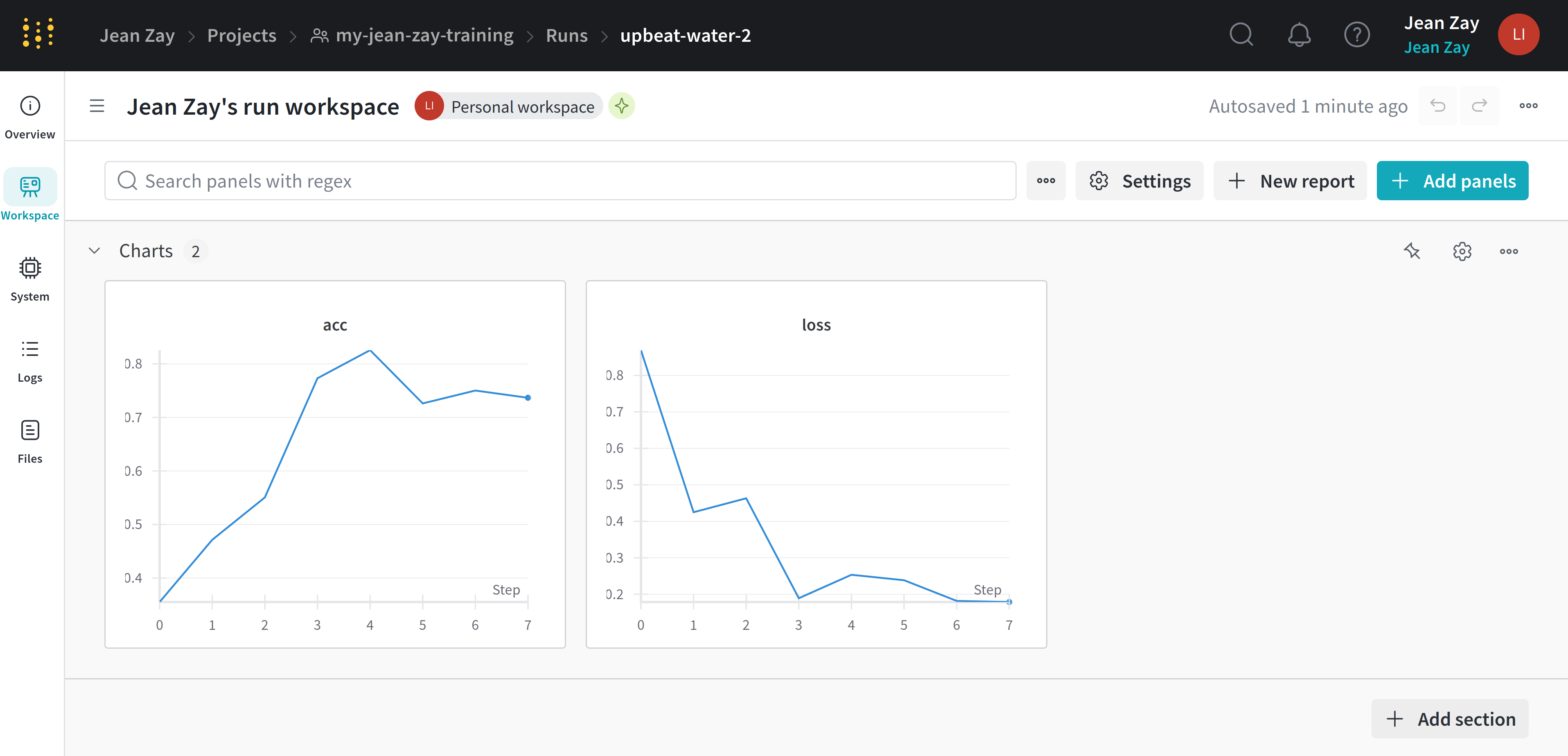
All that remains is to enjoy the visualisation of your logs in your project space: