This page was translated by an AI (LLM) with a cursory human check and is awaiting full review.
IDRIS Tools for Slurm
slurmtop
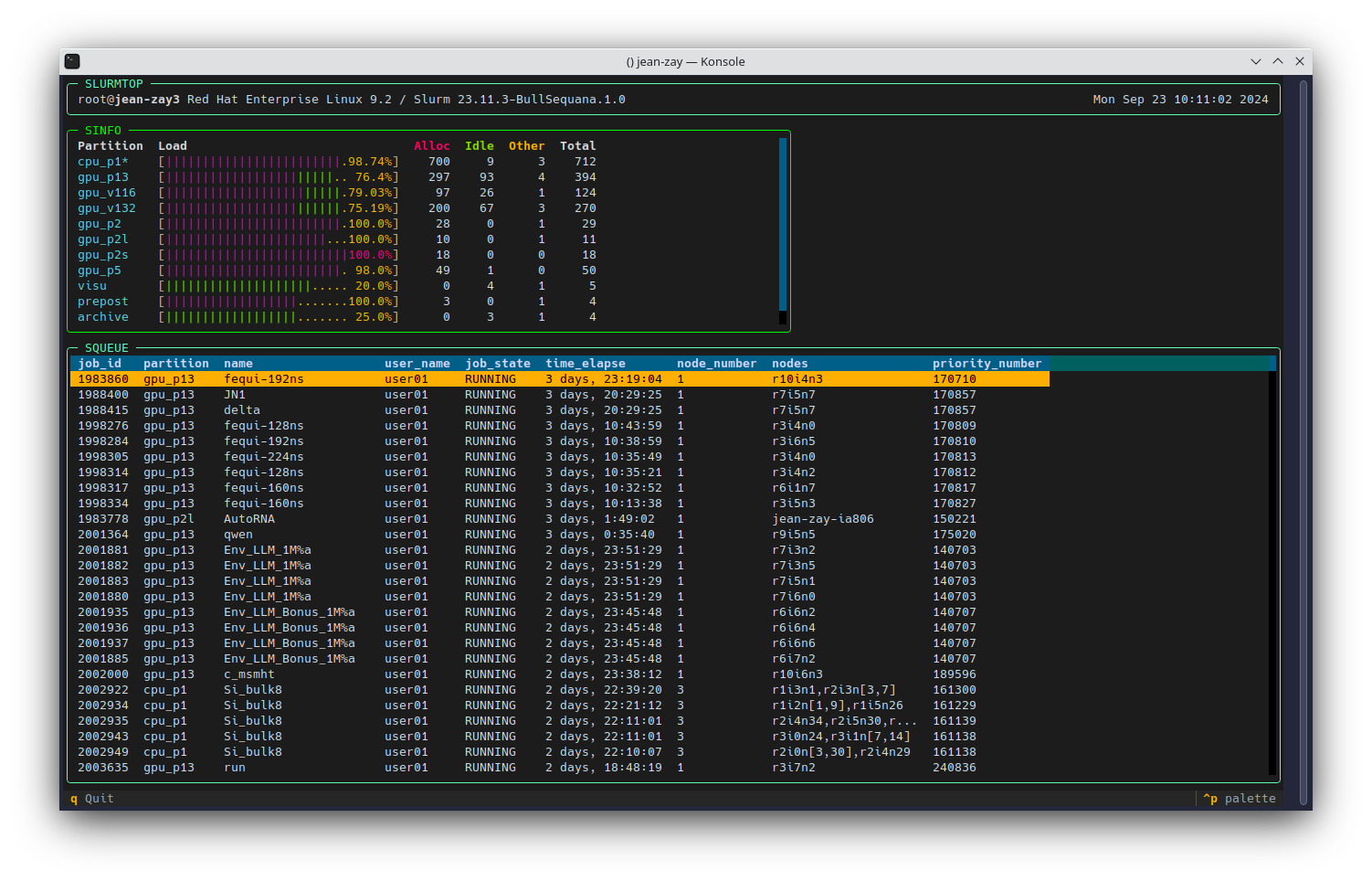
Slurmtop allows you to quickly and graphically (from the terminal) view the load states of the different partitions of a Slurm cluster.
Slurmtop is available via the command slurmtop from the default Python module module load python.
idr_pytools
We provide users of Jean Zay with scripts for the automated execution of GPU jobs via the Slurm job manager. These scripts are designed to be used in a notebook opened on a login node to run distributed jobs on the GPU compute nodes.
The scripts are developed by IDRIS support and installed in all PyTorch or TensorFlow modules.
Importing functions:
from idr_pytools import gpu_jobs_submitter, display_slurm_queue, search_log
Submitting GPU jobs
The gpu_jobs_submitter script allows you to submit GPU jobs to the Slurm queue. It automates the creation of Slurm files according to our guidelines and submits the jobs for execution via the sbatch command.
The automatically created Slurm files are located in the slurm folder. You can consult them to validate the configuration.
Arguments
- srun_commands (mandatory) : the command to execute with
srun. For AI, this is often a Python script to run. Example:'my_script.py -b 64 -e 6 --learning-rate 0.001'. If the first word is a file with a .py extension, the commandpython -uis automatically added before the script name. It is also possible to specify a list of commands to submit multiple jobs. Example:['my_script.py -b 64 -e 6 --learning-rate 0.001', 'my_script.py -b 128 -e 12 --learning-rate 0.01']. - n_gpu : the number of GPUs to reserve for a job. Default is
1 GPU and maximum is 512 GPUs. It is also possible to specify a
list of GPU numbers. Example:
n_gpu=[1, 2, 4, 8, 16]. Thus, a job will be created for each element of the list. If multiple commands are specified in the previous argumentsrun_commands, each command will be run on all requested configurations. - module (mandatory if using modules) : name of the module to load, only one module name allowed.
- singularity (mandatory if using a Singularity container)
: name of the SIF image to load. The command
idrcontmgrwill have been applied beforehand, see the documentation on using Singularity containers. - name : name of the job. It will be displayed in the Slurm queue and
included in the log names. By default, the name of the Python script
specified in
srun_commandsis used. - n_gpu_per_task : the number of GPUs associated with a task. By default, 1 GPU per task in accordance with the data parallelism configuration. However, for model parallelism or for TensorFlow distribution strategies, it will be necessary to associate multiple GPUs with a task.
- time_max : the maximum duration of the job. Default:
'02:00:00'. - qos : the QoS to use if different from the default QoS
(
'qos_gpu-t3') by default. - partition : the partition to use if different from the default
partition (
'gpu_p13') by default. - constraint :
'v100-32g' or'v100-16g'. When using the default partition, this allows you to force the use of 32GB GPUs or 16GB GPUs. - cpus_per_task : the number of CPUs to associate with each task,
default: 10 for the default partition, 3 for the
gpu_p2partition, 8 for thegpu_p5partition and 24 for thegpu_p6partition. It is recommended to leave the default values. - exclusive : forces the use of a node exclusively.
- account : GPU hour allocation to use. Mandatory if you have access to multiple hour allocations and/or projects. For more information, you can refer to our documentation on managing computing hours per project.
- verbose : default
0. The value1adds NVIDIA debugging traces to the logs. - email : email address for automatic sending of job status reports by Slurm.
- addon : allows you to add additional command lines to the Slurm file, for example
'unset PROXY', or for example to load a personal environment:addon="""source .bashrcconda activate myEnv"""
To use the A100 or H100 partition, you will just need to specify it with
account=xxx@a100 or account=xxx@h100 ("xxx" refers to the Unix group; see the output of the command idrproj). Then, the addition of the constraint
and the necessary module to use this partition will be automatically
integrated into the generated .slurm file.
Return
- jobids : list of jobids of submitted jobs.
Example
- Command launched:
jobids = gpu_jobs_submitter(['my_script.py -b 64 -e 6 --learning-rate 0.001',
                            'my_script.py -b 128 -e 12 --learning-rate 0.01'],
                                n_gpu=[1, 2, 4, 8, 16, 32, 64],
                                module='tensorflow-gpu/py3/2.4.1',
                                name="Imagenet_resnet101")
- Display:
    batch job 0: 1 GPUs distributed on 1 nodes with 1 tasks / 1 gpus per node and 3 cpus per task
    Submitted batch job 778296
    Submitted batch job 778297
    batch job 2: 2 GPUs distributed on 1 nodes with 2 tasks / 2 gpus per node and 3 cpus per task
    Submitted batch job 778299
    Submitted batch job 778300
    batch job 4: 4 GPUs distributed on 1 nodes with 4 tasks / 4 gpus per node and 3 cpus per task
    Submitted batch job 778301
    Submitted batch job 778302
    batch job 6: 8 GPUs distributed on 1 nodes with 8 tasks / 8 gpus per node and 3 cpus per task
    Submitted batch job 778304
    Submitted batch job 778305
    batch job 8: 16 GPUs distributed on 2 nodes with 8 tasks / 8 gpus per node and 3 cpus per task
    Submitted batch job 778306
    Submitted batch job 778307
    batch job 10: 32 GPUs distributed on 4 nodes with 8 tasks / 8 gpus per node and 3 cpus per task
    Submitted batch job 778308
    Submitted batch job 778309
    batch job 12: 64 GPUs distributed on 8 nodes with 8 tasks / 8 gpus per node and 3 cpus per task
    Submitted batch job 778310
    Submitted batch job 778312
Interactive display of the Slurm queue
In a notebook, it is possible to display the Slurm queue and pending jobs with the following command: squeue -u $USER
However, this only displays the current state.
The display_slurm_queue function provides a dynamic display of the queue, refreshed every 5 seconds. The function only stops when the queue is empty, which is convenient in a notebook for sequential execution of cells. If the jobs take too long, it is possible to stop the execution of the cell (without impacting the Slurm queue) to regain control of the notebook.
Arguments
- name : allows filtering by job name. The queue only displays jobs with this name.
- timestep : refresh time, default: 5 seconds.
Example
- Command launched:
display_slurm_queue("Imagenet_resnet101")
- Display:
    JOBID PARTITION     NAME     USER ST       TIME  NODES NODELIST(REASON)
    778312    gpu_p2 Imagenet  ssos040 PD       0:00      8 (Priority)
    778310    gpu_p2 Imagenet  ssos040 PD       0:00      8 (Priority)
    778309    gpu_p2 Imagenet  ssos040 PD       0:00      4 (Priority)
    778308    gpu_p2 Imagenet  ssos040 PD       0:00      4 (Priority)
    778307    gpu_p2 Imagenet  ssos040 PD       0:00      2 (Priority)
    778306    gpu_p2 Imagenet  ssos040 PD       0:00      2 (Priority)
    778305    gpu_p2 Imagenet  ssos040 PD       0:00      1 (Priority)
    778304    gpu_p2 Imagenet  ssos040 PD       0:00      1 (Priority)
    778302    gpu_p2 Imagenet  ssos040 PD       0:00      1 (Priority)
    778301    gpu_p2 Imagenet  ssos040 PD       0:00      1 (Priority)
    778296    gpu_p2 Imagenet  ssos040 PD       0:00      1 (Resources)
    778297    gpu_p2 Imagenet  ssos040 PD       0:00      1 (Resources)
    778300    gpu_p2 Imagenet  ssos040 PD       0:00      1 (Resources)
    778299    gpu_p2 Imagenet  ssos040  R       1:04      1 jean-zay-ia828
Searching for log paths
The search_log function allows you to find the paths to the log files of jobs executed with the gpu_jobs_submitter function.
The log files have a name with the following format:
'{name}@JZ_{datetime}_{ntasks}tasks_{nnodes}nodes_{jobid}'.
Arguments
- name : allows filtering by job name.
- contains : allows filtering by date, number of tasks, number
of nodes or jobid. The character '*' allows concatenating
multiple filters. Example:
contains='2021-02-12_22:*1node' - with_err : default False. If True, returns a dictionary with the paths of the output files and error files listed in chronological order. If False, returns a list with only the paths of the output files listed in chronological order.
Example
- Command launched:
paths = search_log("Imagenet_resnet101")
- Display:
    `['./slurm/log/Imagenet_resnet101@JZ_2021-04-01_11:23:46_8tasks_4nodes_778096.out',
     './slurm/log/Imagenet_resnet101@JZ_2021-04-01_11:23:49_8tasks_4nodes_778097.out',
     './slurm/log/Imagenet_resnet101@JZ_2021-04-01_11:23:53_8tasks_4nodes_778099.out',
     './slurm/log/Imagenet_resnet101@JZ_2021-04-01_11:23:57_8tasks_8nodes_778102.out',
     './slurm/log/Imagenet_resnet101@JZ_2021-04-01_11:24:04_8tasks_8nodes_778105.out',
     './slurm/log/Imagenet_resnet101@JZ_2021-04-01_11:24:10_8tasks_8nodes_778110.out',
     './slurm/log/Imagenet_resnet101@JZ_2021-04-07_17:53:49_2tasks_1nodes_778310.out',
     './slurm/log/Imagenet_resnet101@JZ_2021-04-07_17:53:52_2tasks_1nodes_778312.out']
The paths are sorted in chronological order. If you want the last 2 paths, you can use the following command:
paths[-2:]