RAPIDS - GPU-accelerated Data Science
This page was translated by an AI (LLM) with a cursory human check and is awaiting full review.
This page highlights the GPU-accelerated RAPIDS (NVIDIA) solution for all data science and Big Data tasks: data analysis, data visualisation, data modelling, machine learning (random forest, PCA, gradient boosted trees, k-means, etc.). On Jean Zay, you just need to load the corresponding module to use RAPIDS, for example:
module load rapids/24.04
The best solution for a data study with RAPIDS on Jean Zay is to open a notebook interactively on a compute node via a JupyterHub instance.
On a Jean Zay compute node, there is no internet access. Any library installation or data download must be done before reserving resources on the compute node.
At the end of this page, you will find a link to example notebooks showcasing RAPIDS features.
This documentation is limited to the use of RAPIDS on a single node (mono-GPU and multi-GPU).
GPU Acceleration
Using RAPIDS and GPUs becomes interesting compared to traditional CPU solutions when the data array being manipulated reaches several gigabytes in memory. In this case, the acceleration of most read/write tasks, data pre-processing, and machine learning is notable.
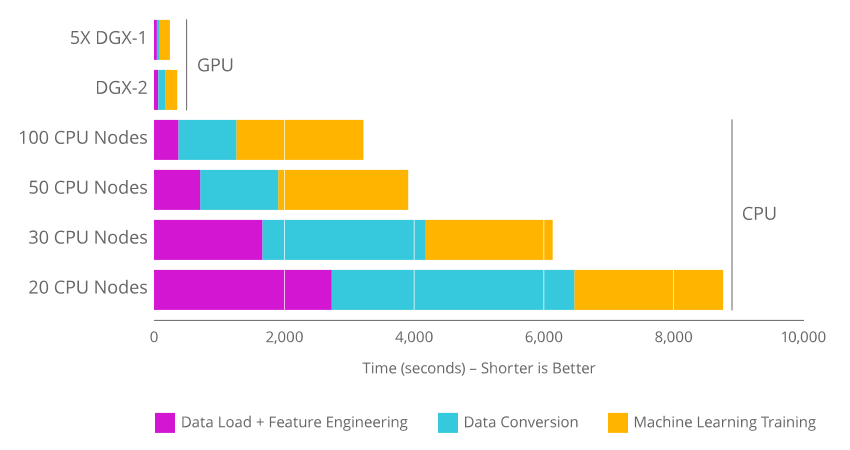
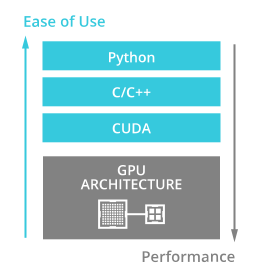
RAPIDS APIs optimise the use of GPUs for data analysis and machine learning tasks. Porting Python code is simple: all RAPIDS APIs replicate the functionalities of reference CPU processing APIs.
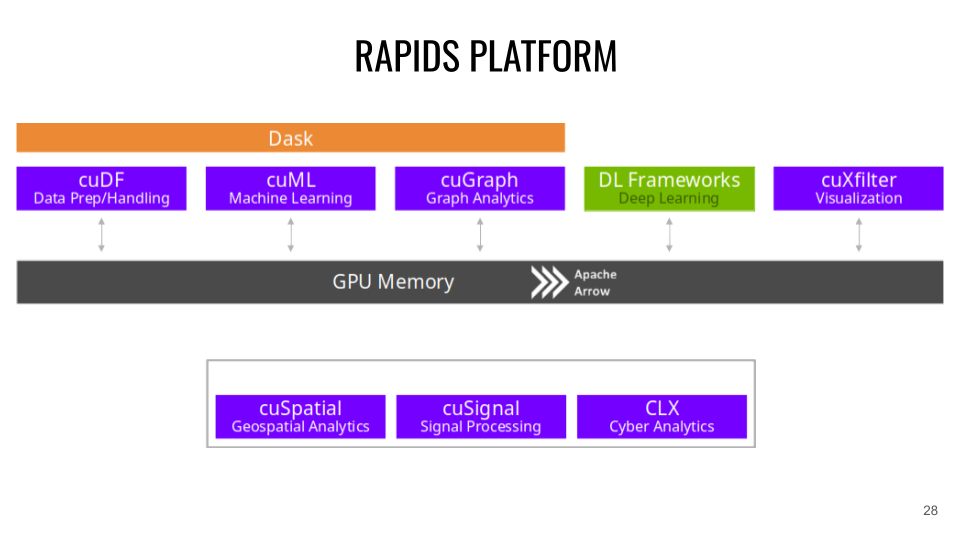
RAPIDS Platform and APIs
RAPIDS is based on Apache Arrow, which handles the in-memory storage of data structures.
-
CuDF (CPU equivalent: Pandas). CuDF is a GPU DataFrames library for data loading, merging, aggregation, filtering, and other data manipulations. Example:
import cudftips_df = cudf.read_csv('dataset.csv')tips_df['tip_percentage'] = tips_df['tip'] / tips_df['total_bill'] * 100# display average tip by dining party sizeprint(tips_df.groupby('size').tip_percentage.mean()) -
CuML (CPU equivalent: scikit-learn). CuML is a Machine Learning algorithm library for tabular data, compatible with other RAPIDS APIs and the scikit-learn API (XGBOOST can also be used directly on RAPIDS APIs). Example:
import cudffrom cuml.cluster import DBSCAN# Create and populate a GPU DataFramegdf_float = cudf.DataFrame()gdf_float['0'] = [1.0, 2.0, 5.0]gdf_float['1'] = [4.0, 2.0, 1.0]gdf_float['2'] = [4.0, 2.0, 1.0]# Setup and fit clustersdbscan_float = DBSCAN(eps=1.0, min_samples=1)dbscan_float.fit(gdf_float)print(dbscan_float.labels_) -
CuGraph (CPU equivalent: NetworkX). CuGraph is a Graph analysis library that takes a GPU Dataframe as input. Example:
import cugraph# read data into a cuDF DataFrame using read_csvgdf = cudf.read_csv("graph_data.csv", names=["src", "dst"], dtype=["int32", "int32"])# We now have data as edge pairs# create a Graph using the source (src) and destination (dst) vertex pairsG = cugraph.Graph()G.from_cudf_edgelist(gdf, source='src', destination='dst')# Let's now get the PageRank score of each vertex by calling cugraph.pagerankdf_page = cugraph.pagerank(G)# Let's look at the PageRank Score (only do this on small graphs)for i in range(len(df_page)):print("vertex " + str(df_page['vertex'].iloc[i]) +" PageRank is " + str(df_page['pagerank'].iloc[i])) -
Cuxfilter (CPU equivalent: Bokeh / Datashader). Cuxfilter is a data visualisation library. It allows connecting GPU-accelerated crossfiltering to a web representation.
-
CuSpatial (CPU equivalent: GeoPandas / SciPy.spatial). Cuspatial is a spatial data processing library including point polygons, spatial joins, geographic coordinate systems, primitive shapes, distances, and trajectory analyses.
-
CuSignal (CPU equivalent: SciPy.signal). Cusignal is a signal processing library.
-
CLX (CPU equivalent: cyberPandas). CLX is a cybersecurity data processing and analysis library.
Multi-GPU Acceleration with Dask-CUDA
The Dask-CUDA library allows the use of the main RAPIDS APIs on multiple GPUs within a Dask Cluster. This accelerates your code and, above all, allows you to process data arrays of tens or hundreds of gigabytes, which would saturate the RAM of a single GPU.
To configure a Dask Cluster that utilises all GPUs on a node:
from dask.distributed import Client
from dask_cuda import LocalCUDACluster

cluster = LocalCUDACluster()
client = Client(cluster)
It is possible to use multi-node Dask Clusters with Slurm, but the setup is complex and not covered here.
Dask operates on a workflow principle. Commands to be executed are first organised by Dask within a computational graph. Their execution is triggered in a second step by calling the function .compute().
import dask_cudf

ddf = dask_cudf.read_csv('x.csv')
mean_age = ddf['age'].mean()
mean_age.compute()
By default, the result obtained is concatenated and stored in the memory of a single GPU (the one corresponding to the "client" process of the Cluster). If subsequent calculations are planned, it is possible to keep the result in memory on each GPU to avoid unnecessary transfers. This is done using the command .persist():
ddf = dask_cudf.read_csv('x.csv')
ddf = ddf.persist()
ddf['age'].mean().compute()
Example with cuML:
from dask.distributed import Client
from dask_cuda import LocalCUDACluster
import dask_cudf
import cuml
from cuml.dask.cluster import KMeans

cluster = LocalCUDACluster()
client = Client(cluster)

ddf = dask_cudf.read_csv('x.csv').persist()
dkm = KMeans(n_clusters=20)
dkm.fit(ddf)
cluster_centers = dkm.cluster_centers_
cluster_centers.columns = ddf.column
labels_predicted = dkm.predict(ddf)
class_idx = cluster_centers.nsmallest(1, 'class1').index[0]
labels_predicted[labels_predicted==class_idx].compute()
Example Notebooks on Jean Zay
You will find example notebooks (cuml, xgboost, cugraph, cusignal, cuxfilter, clx) in the RAPIDS demonstration containers.
These notebooks are available on Jean Zay. To copy them to your personal space, you need to run the following command:
cp -r $DSDIR/examples_IA/Rapids $WORK