This page was translated by an AI (LLM) with a cursory human check and is awaiting full review.
Introduction to NCL
Presentation
NCL is a set of graphical subroutines written in Fortran and interfaced with the GKS base software. It is distributed by the National Center for Atmospheric Research (Boulder Colorado). NCL allows the creation of plots (curves, histograms, contour lines, 3D visualisation, cartographic contours, etc.) by calling a few subroutines.
NCL is composed of subroutines called utilities that can be divided into large classes of graphical functions.
- AREAS Definition of polygonal areas
- AUTOGRAPH Plotting of y=f(x) type curves
- COLCONV Colour management (RGB, HLS, HSV conversion)
- CONPACK Contour line plotting
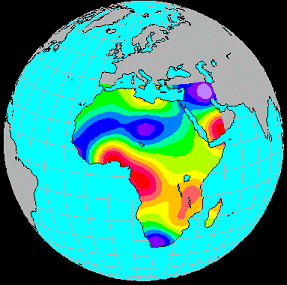
- EZMAP Line mode cartographic plotting
- EZMAPA Surface mode cartographic plotting
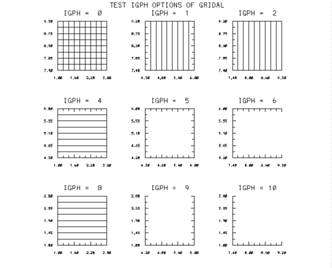
- GRIDAL Plotting of grids, axes, frames
- HISTGR Plotting of histograms
- ISOSRF 3D visualisation
- LABELBAR Labels giving the correspondence between colour and values
- SOFTFILL Surface filling with colours or patterns
- SRFACE Plotting of y=f(x,y) type surfaces
- PLOTCHAR Plotting of special characters
- STRMLM Plotting of streamlines
- THREED Plotting of 3D curves
- VELVCT Plotting of vector fields
GKS
NCL can be used with the original NCAR GKS software, which allows CGM metafile outputs (level 0A). GKS Graphical Kernel System is a set of low-level graphical functions. GKS has been an AFNOR standard since 1984 and an ISO standard since 1985.
Main GKS primitives
GKS includes a number of basic functions (primitives) that can be divided into classes.
Polyline
- GPL - Polyline
- GSLN - Set line type
- GSLWSC - Set linewidth scale factor
- GSPLCI - Polyline color index
Polymarker
- GPM - Polymarker.
- GSMK - Set marker type.
- GSMKSC - Set marker size scale factor.
- GSPMCI - Polymarker color index.
Text
- GTX - Text
- GSTXAL - Set text alignment.
- GSTXCI - Set text color index.
- GSTXFP - Set text font and precision.
- GSTXP - Set text path
- GSCHH - Set character height.
- GSCHSP - Set character spacing.
- GSCHUP - Set character up vector.
- GSCHXP - Set character expansion factor.
Fill area
- GCA - Cell array.
- GFA - Set marker type.
- GSFACI - Set fill area color index.
- GSFAIS - Set fill area interior style.
Workstation management
- GACWK - Activate workstation
- GCLKS - Close GKS
- GCLRWK - Clear workstation
- GCLWK - Close workstation
- GDAWK - Deactivate workstation
- GESC - Escape.
- GOPKS - Open GKS.
- GOPWK - Open workstation.
- GSELNT - Select normalization transformation.
- GSCLIP - Set clipping indicator.
- GSCR - Set color representation.
- GSVP - Set viewport.
- GSWN - Set window.
Query functions
- GQCHH - Inquire character height.
- GQCHSP - Inquire character spacing.
- GQCHUP - Inquire character up vector.
- GQCHXP - Inquire character expansion factor.
- GQCLIP - Inquire clipping indicator.
- GQCNTN - Inquire current transformation number.
- GQCR - Inquire color representation.
- GQFACI - Inquire fill area color index.
- GQFAIS - Inquire fill area interior style.
- GQFASI - Inquire fill area style index.
- GQLN - Inquire line type.
- GQLWSC - Inquire linewidth scale factor.
- GQMK - Inquire marker type.
- GQMKSC - Inquire marker size scale factor.
- GQMNTN - Inquire maximum transformation number.
- GQNT - Inquire normalization transformation.
- GQOPS - Inquire operating state value.
- GQOPSG - Inquire name of open segment.
- GQPLCI - Inquire polyline color index.
- GQPMCI - Inquire polymarker color index.
- GQSGUS - Inquire set of segment names in use.
- GQTXAL - Inquire text alignment.
- GQTXCI - Inquire text color index.
- GQTXFP - Inquire text font and precision.
- GQTXP - Inquire text path.
Levels
GKS can be used in different functionality modes according to the possibilities of the input devices (locator, stroke, valuator, choice, pick, string)
- request mode (request mode): the request mode corresponds roughly to the type of input used in FORTRAN.
- sampling mode (sample mode): the application program and the input process are active simultaneously. The input process provides data to the GKS program which "takes it on the fly". Depending on the amount of data and the acquisition speed, data may be lost.
- event mode (event mode): the GKS program and the input process are active simultaneously, the captured values are placed in a queue that the program must read in chronological order.
- Input level
- a - No input function available
- b - Request mode only
- c - Request, sampling and event mode
- Output level
- 0 - Minimum output, only one workstation output at a time.
- 1 - Several workstations output available at the same time. Use of segments and several normalization transformations.
- 2 - Use of the independent segment storage station WISS.
- Input level
Structure of a GKS program
 integer ecran,pilote
 ecran = 1
 pilote = 8
 call gopks(6,10000)        ! ouverture de GKS
 call gopwk(ecran,1,pilote) ! ouverture X-window
 call gacwk(ecran)          ! activation du poste de travail
  ...
  Programme GKS
  ...
 call gclrwk(ecran,1)       ! effacement de l'ecran/avance papier
 call gdawk(ecran)          ! desactivation poste de travai
 call gclwk(ecran)          ! fermeture du poste de travail
 call gclks                 ! fermeture de GKS
The first three calls (gopks, gopwk, gacwk) can be replaced by opngks for a CGM file output and the last three (gdawk, gclwk, gclks) by clsgks.
The names of the examples in the plot legends refer to the NCAR program which can be obtained by the ncargex procedure.
Curves: Autograph
Plotting of curves or families of curves with or without annotations.
- EZY Drawing of a curve defined by the points (i,y(i), i=1,npoints)
- EZXY Drawing of a curve defined by the points (x(i), y(i), i=1,npoints)
- EZMXY Set of curves defined by the points (x(i), y(i,j), i=1,npoints), j=1,nbcourbe)
- AGSETx Definition of autograph_params parameters
  real   x(20),Y(20)
  call opngks
  do i=1,20
    x(i) = float(i-1)*.314
    y(i) = x(i) + cos(x(i))*2.0
  enddo
  call ezxy (x,y,20,'Example (EZXY)$')
  call clsgks
  end

Grids and axes: Gridal
Plotting of grids, axes and frames.
- GRID Plotting of a grid without labels.
- GRIDL Plotting of a grid with labels.
- HALFAX Plotting of a pair of axes.
- PERIM Plotting of a perimeter without labels.
- PERIML Plotting of a set of grids, perimeter.
- GRIDAL Plotting of all the above functions .
- GASETx Definition of gridall_params parameters
Isocontours: Conpack
Plotting of isocontours and isosurfaces from data regularly spaced on a rectangular grid.
- CPRECT Initialisation of the isocontour function associated with a rectangular array.
- CPSPS1 Interpolation of a non-dense array on a dense regular rectangular grid.
- CPCLDR Plotting of contour lines
- CPCLAM Plotting of contour lines on a surface.
- CPLBDR Plotting of labels on a contour line.
- CPSETx Definition of conpack_params parameters
- CPGETx Retrieval of parameters
- CPSETC Assignment of a character type parameter
- CPSETI Assignment of an integer type parameter
- CPSETR Assignment of a real type parameter
Some Conpack parameters
The parameters are character variables of length 3 to which a value is assigned as desired.
AIA- Area Identifier Above - Integer ArrayAIB- Area Identifier Below - Integer ArrayCIS- Contour Interval Specifier - RealCLS- Contour Level Selection Flag- IntegerCLU- Contour Level Use Flags - Integer ArrayCLV- Contour Level Values - Real ArrayNCL- Number of Contour Levels - IntegerCMN- Contour Minimum - RealCMX- Contour Maximum - RealORV- Out-of-Range ValuePAI- Parameter Array Index - IntegerT2D- Tension on 2-Dimensional Splines - RealVPB- Viewport Bottom - RealVPL- Viewport Left - RealVPR- Viewport Right - RealVPT- Viewport Top - RealXC1- X Coordinate at Index 1 - RealXCM- X Coordinate at Index M - RealYC1- Y Coordinate at Index 1 - RealYCM- Y Coordinate at Index M - Real
Choice of the number of contours equal to 13:
CALL CPSETI('NCL --- NUMBER OF CONTOURS',13)
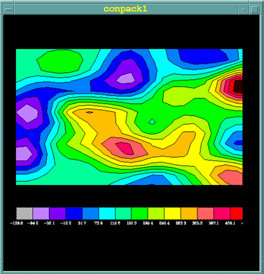
Example - Conpack1
    parameter (nb_niveaux=14,nb_labels=nb_niveaux+1)
    parameter (m=23,n=14)
    dimension z(m,n),rwrk(1000),iwrk(1000),map(20000)
    dimension xca(1000),yca(1000),aia(10),gia(10)
    dimension index_col(nb_niveaux) ! indices de couleurs
    data    index_col / 2,3,4,5,6,7,8,9,10,11,12,13,14,15 /
    character*10 labels(nb_labels)  ! liste des labels
    integer   orient_barre,orient_texte
    character*10 labels(nb_labels)  ! liste des labels
    external COLOR  ! sp externe pour colorer les surfaces

    call OPNGKS     ! Ouverture de GKS
    call GSFAIS(1)  ! Remplissage en mode plein
    call DEFCOL     ! Definition des couleurs
  !
  ! Generation du fichier des donnees 23x14 de -136. a 451.
  !
    call GENDAT (z,m,m,n,20,20,-136.,451.)
  !
  !     Definition du cadre du trace dans la partie superieure
  !
    call CPSETR ('VPB - viewport bottom',.25)
  !
  !     Definition de 13 niveaux repartis en 14 intervals
  !
    call CPSETI ('CLS - contour level selector',-13)
  !
  ! Initialisation de conpack
  !
    call CPRECT (z,m,m,n,rwrk,1000,iwrk,1000)
  !
  !     Initialisation area map et lignes de contour lines au-dessus
  !
    call ARINAM (map,20000)
    call CPCLAM (z,rwrk,iwrk,map)
  !
  ! Coloration par appel du sous-programme COLOR
  !
    call ARSCAM (map,xca,yca,1000,ai,ag,10,color)
  !
  ! Trace des lignes de contours
  !
    call GSPLCI (0)
    call CPCLDR (zt,rwrk,iwrk)
    call GSPLCI (1)
  !
  ! Ecriture labels apres recuperation des valeurs min et max
  !
    orient_barre = 0
    orient_texte = 1
    xorlab=.05
    xfinlab=.95
    yorlab=.15
    yfinlab=.25
    call CPGETR ('ZMN',zmin)
    call CPGETR ('ZMX',zmax)
    do i=1,nb_labels
         call CPSETR ('ZDV - z data value',
  +         zmin+real(i-1)*(zmax-zmin)/nb_niveaux)
        call CPGETC ('ZDV - z data value',labels(i))
    enddo
    call LBSETI ('CBL - color of box lines',0)
    call LBLBAR (orient_barre,xorlab,xfinlab,yorlab,yfinlab,
  +     nb_niveaux,1.,.5,index_col,0,labels,nb_labels,orient_texte)
    call CLSGKS             ! Fermeture de GKS
    end

    subroutine COLOR(xca,yca,nca,ai,ag,nai)
    implicit none
    real xca(nca),yca(nca)
    integer ai(nai),ag(nai)
    integer fill
  !
  !       Les tableaux xca et yca contiennent les coordonnees de
  !     polygones de nca points
  !
  !        Les tableaux ai et ag sont de longueur 2
  !         ai : identificateur d'aire
  !         ai(1) = 1 a nb_niveau representant un identificateur d'aire
  !         ai(2) = -1 -> zone hors cadre - ai(2) = 0 -> zone hors cadre
  !         ag = 1-2 (ezmap) 3-4 (conpack) identificateur de groupes
  !
    fill = 1             ! Par defaut, polygone rempli
    do i=1,nai
        if (ai(i).lt.0) fill = 0 !Mais pas si un ai < 0
    end do
  *
    if (fill.ne.0) then              ! Si polygone a remplir
      fill = 0
      do i=1,nai                 ! Balayage indices d'identifier
        if (ag(i).eq.3) fill = ai(i) ! Si groupe 3 c'est un contour
      end do
      if (fill.gt.0) then
        call gsfaci(fill+2)
        call gfa(nca-1,xca,yca)
            end if
    end if
    return
    end

    subroutine DEFCOL
    dimension rgbv(3,0:15)
    data rgbv /0.00 , 0.00 , 0.00 ,     ! noir
  +              1.00 , 1.00 , 1.00 ,   ! blanc
  +              0.70 , 0.70 , 0.70 ,
  +          0.75 , 0.50 , 1.00 ,
  +              0.50 , 0.00 , 1.00 ,
  +              0.00 , 0.00 , 1.00 ,
  +              0.00 , 0.50 , 1.00 ,
  +              0.00 , 1.00 , 1.00 ,
  +              0.00 , 1.00 , 0.00 ,
  +              0.70 , 1.00 , 0.00 ,
  +              1.00 , 1.00 , 0.00 ,
  +              1.00 , 0.75 , 0.00 ,
  +              1.00 , 0.38 , 0.38 ,
  +              1.00 , 0.00 , 0.38 ,
  +              1.00 , 0.00 , 0.00 /
    do  i=0,15  ! Definition de 16 couleurs en mode RGB
        call gscr(1,i,rgbv(1,i),rgbv(2,i),rgbv(3,i))
    enddo
    return
    end
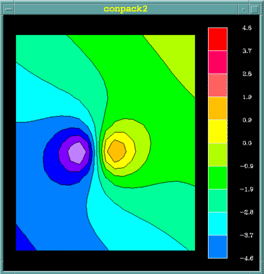
Example - Conpack2
    external COLOR
    parameter (m=21,n=25)
    parameter (nb_niveaux=10,nb_labels=nb_niveaux+1)
    integer   orient_barre,orient_texte,ai(10),ag(10)
    real      niveau_min,niveau_max
    dimension z(m,n)
    dimension rwrk(1000),iwrk(1000),map(20000)
    dimension xca(1000),yca(1000)
    dimension index_col(nb_niveaux)
    character*7 labels(nb_labels)  ! liste des labels
  !
  !  Definition des indices de couleurs
    data index_col / 6,7,8,9,10,11,12,13,14,15 /
  !
  !  Calcul des valeurs de z(i,j)
  !
    do  i=1,m
        x=.1*(i-m/2)
        do  j=1,n
            y = .1*(j-n/2)
            z(i,j)=x+y+1./((x-.10)**2+y**2+.09)
    +                   -1./((x+.10)**2+y**2+.09)
        enddo
    enddo
    call GSFAIS (1)
    call DEFCOL
  !
  !  Definition du cadre dans la partie gauche
  !
     call CPSETR ('VPR - VIEWPORT RIGHT',.75)
  !
  !      Calcul du minimum et maximum du tableau Z
  !
    niveau_min = z(1,1)
    niveau_max = niveau_min
    do j=1,n
        do i=1 ,m
            zij = z(i,j)
            if (zij.lt.niveau_min) niveau_min = zij
            if (zij.gt.niveau_max) niveau_max = zij
        end do
    end do
    zc = niveau_min
    dz = (niveau_max-niveau_min)/nb_niveaux
  !
  !     Ecriture des labels de nb_niveaux aires
  !
    do i=1,nb_niveaux + 1
         write(labels(i),'(f7.1)') zc
         zc = niveau_min + dz + (i-1) * dz
    end do
  !
  !     Fixation du nombre de courbes de niveau
  !
    call CPSETI('CLS',0)    ! Pour prendre le controle
    call CPSETI('NCL',nb_niveaux)   ! Nombre de contours
    do i=1,nb_niveaux   ! Ident. d'aires : 1 a nb_niveaux
        zc = niveau_min + dz + (i-1) * dz
        call CPSETI('PAI',i)     ! Travail sur le ieme niveau
        call CPSETR('CLV',zc)    ! Valeur de ce niveau
        call CPSETI('CLU',1)     ! type de ligne de contour
        call CPSETI('AIB',i)     ! Indice aire au-dessous niveau i

        call CPSETI('AIA',i+1)   ! Indice aire au-dessus niveau i
    end do
  !
  !     Initialisation Conpack
  !
    call CPRECT (z,m,m,n,rwrk,1000,iwrk,1000)
  !
  !  Initialisation area map et ligne de contours lines au-dessus
  !
    call ARINAM (map,20000)
    call CPCLAM (z,rwrk,iwrk,map)
  !
  !     Coloration par appel au sous-programme COLOR
  !
    call ARSCAM (map,xca,yca,1000,ai,ag,10,color)
  !
  !     Trace des lignes de contours en noir
  !
    call GSPLCI (0)
    call CPCLDR (z,rwrk,iwrk)
    call GSPLCI (1)
  !
  !     Trace de la legende
  !
    orient_barre = 1
  !     labels dessous (horizontal) a droite (vertical)
    orient_texte = 1
    xorlab=.80
    xfinlab=.95
    yorlab=.05
    yfinlab=.95
    call LBLBAR(orient_barre,xorlab,xfinlab,yorlab,yfinlab,
  + nb_niveaux,.5,1.,index_col,0,labels,nb_niveaux+1,orient_texte)
    stop
    end
Line mode cartographic plotting: Ezmap
Ezmap projects the continental boundaries of countries onto the Earth's surface. You can choose the type of projection (Lambert, stereographic, ...), the origin of the viewpoint, the orientation and the representation of parallels and meridians
- MAPDRW Plotting of a complete map.
- MAPINT Initialisation EZMAP.
- MAPGRD Plotting of parallels and meridians.
- MAPROJ Definition of the type of projection of the latitude and longitude of the viewpoint and the angle of rotation of the Earth
- MAPSET Definition of the visible geographical area.
- maximum view.
- minimum and maximum latitude and longitude.
- limits in normalised coordinates.
- MAPTRN Transformation of latitude and longitude data into normalised coordinates.
- MPSETx Definition of ezmap_params parameters
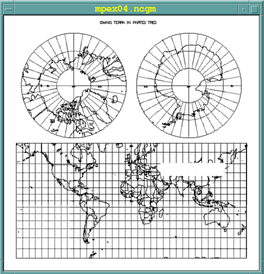
Example mpex04
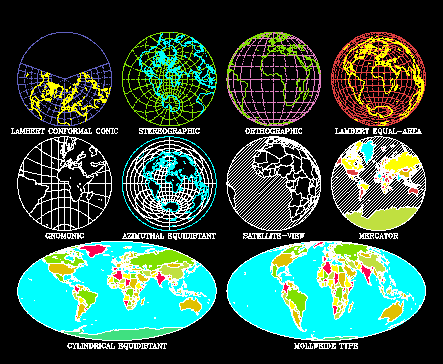
Different types of projections
Surface mode cartographic plotting: Ezmapa
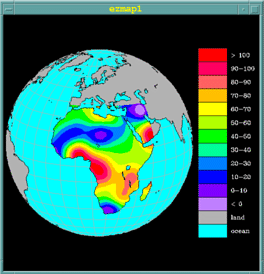
EZMAPA allows the redirection of the outputs obtained by EZMAP in the AREAS utility, thus allowing the superposition of coloured surfaces with cartographic backgrounds.
- MAPINT Initialisation EZMAP
- MAPBLA Defines the limits of a geographical area on a surface calculated by EZMAP.
- MAPLOT Plotting of geographical contours
- MAPGRM Plotting of longitude and latitude lines masked by a surface
- I=MAPACI(A) Provides the colour index I of an area A.
- MPSETx Definition of ezmap_params parameters
Example ezmap1
    parameter (nb_niveaux=14,nb_labels=nb_niveaux)
    parameter (m=40,n=40
    integer   orient_barre,orient_texte
    dimension z(m,n),rwrk(1000),iwrk(1000),map(200000
    dimension xca(5000),yca(5000)
    integer   ai(10),ag(10)
    dimension index_col(nb_niveaux)
    data index_col/ 7,2,3,4,5,6,8,9,10,11,12,13,14,15
    character*10 labels(nb_labels)
    data labels / `ocean  ` , `land   ` , `< 0    ` , `0-10   `
    +         `10-20  ` , `20-30  ` , `30-40  ` , `40-50  `  ,
    +         `50-60  ` , `60-70  ` , `70-80  ` , `80-90  `  ,
    +             `90-100 ` , `> 100  ` /
    call opngks
    call gfais (1)  ! Remplissage en mode plein
    call defcol     ! Definition des couleurs
  !
  ! Creation des donnees
  !
    call gendat (z,40,40,40,15,15,-10.,110.)
  !
  ! Initialisation area map.
  !
    call arinam (map,200000)
  !
  ! Initialisation Ezmap
  !
    call mappos (.01,.74,.01,.99)
    call maproj ('OR - orthographic projection',15.,15.,0.)
    call mapset ('MA - maximal area',0.,0.,0.,0.)
    call mapstc ('OU - outline dataset','co')
    call mapin
    call mapbla (map)
  !
  ! L'appel du sp SET est fait par ezmap en non par conpack (set=0)
  ! Definition des limites en latitude et longitude
  ! Les coordonnees(x,y) sont vues comme des latitudes et des logitudes.
  !
    call cpseti ('SET - do-set-call flag',0)
    call cpseti ('MAP - mapping flag',1)
    call cpsetr ('XC1 - x coordinate at i=1',-18.)
    call cpsetr ('XCM - x coordinate at i=m',+52.)
    call cpsetr ('YC1 - y coordinate at j=1',-35.
    call cpsetr ('YCN - y coordinate at j=n',+38.)
  !
  ! Definition des n niveaux de contours tels que
  ! cmn < cmn + cis*cls < cmx
  !
    call cpseti ('CLS - contour level selector',1)
    call cpsetr ('CMN - contour level minimum',0.)
    call cpsetr ('CMX - contour level maximum',100.)
    call cpsetr ('CIS - contour interval specifier',10.)
    call cpsetr ('ORV - out-of-range value',1.e12)
    call cprect (z,m,m,n,rwrk,1000,iwrk,1000)
    call cpclam (z,rwrk,iwrk,map)
    call arscam (map,xca,yca,5000,ai,ag,10,color)
  !
  ! Trace des limites continentales en noir et des paralleles et
  ! meridiens au-dessus des oceans
  !
    call gsplci (0)
    call maplot
    call cpcldm (z,rwrk,iwrk,map,colrcl)
    call gsplci (2)
    call mapgrm (map,xca,yca,5000,ai,ag,10,colrll)
    call gsplci (1)
  !
  ! Trace echelle de couleurs
  !
    orient_barre = 1
    orient_texte = 1
    orlab=.76
    xfinlab=.99
    orlab=.13
    yfinlab=.87
    call lbseti ('CBL - color of box lines',0)
    call LBLBAR(orient_barre,xorlab,xfinlab,yorlab,yfinlab,
         + nb_niveaux,.5,1.,index_col,0,labels,nb_labels,orient_texte)
    call clsgks
    stop
    end

    subroutine COLOR (xca,yca,nca,ai,ag,nai)
    implicit none
    real xca(*),yca(*)
    integer ai(*),ag(*),index_co(12)
    integer ncs,i,nai,ai1,ai3,mapaci
  !
  !     Tableau des indices de couleurs
  !
    data index_col / 3,4,5,6,8,9,10,11,12,13,14,15 /
  !
  ! Recherche des identificateurs d'aire pour les groupes 1 et 3 le
  ! premier indique si la zone est au-dessus de la terre ou l'ocean
  !
    ai1=-1
    ai3=-1
    do  i=1,nai
      if (ag(i).eq.1) ai1=ai(i)           ! Ezmap
      if (ag(i).eq.3) ai3=ai(i)           ! Conpack
    enddo

    if (ai1.gt.0) then                    ! zone Ezmap a representer
            if (mapaci(ai1).eq.1) then        ! zone au dessus de l'ocean
        call gsfaci (7)                   ! couleur cyan (index 7 de rgbv )
        call gfa (nca-1,xca,yca)
            else                      ! zone au dessus de la terre
        if (ai3.le.0) then                ! qui est hors limites
                 call gsfaci (2)              ! couleur  gris
                 call gfa (nca-1,xca,yca)
              else                            ! zone au dessus de la terre
                 call gsfaci (index_col(ai3)) ! dans les limites ai3 > 0
           call gfa (ncs-1,xca,yca)       ! a representer par conpack
        end if
      end if
    end if
    return
    end
Surface filling: Areas
Definition of polygonal areas for hatching or colouring. The surfaces thus defined can be used in relation with EZMAPA.
- ARINAM Initialisation AREAS.
- AREDAM Definition of the different types of areas constituting the surface.
- ARPRAM Preprocessing of the surface
- ARSCAM Use of surface definitions for colouring by a user subroutine.
- ARSETx Definition of areas_params parameters
Streamlines: Strmln
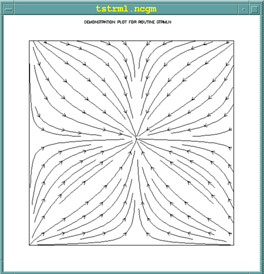
- STINIT Initialisation of a streamline plot
- STREAM Plotting of streamlines
- STSETx Definition of streamlines_params parameters
Example strmln
  parameter (m=21, n=25, iwsize = 2*m*n)
  real u(m,n), v(m,n), wrk(iwsize)
  gisize = 2.0*pi/float(m)
  gjsize = 2.0*pi/float(n)
  do j = 1,n
  do  i = 1,m
  u(i,j) = cos(gisize*(float(i)-1.0))   ! Calcul des valeurs
  horizontales
  v(i,j) = cos(gjsize*(float(j)-1.0))   ! et verticales des vecteurs u et  v
  enddo
  enddo
  idm = 0
  rdm = 0.0
  call stinit(u,m,v,m,rdm,idm,m,n,wrk,iwsize)
  call stream(u,v,rdm,idm,idm,wrk)  !Trace des lignes de courant
Vector field: Velvct
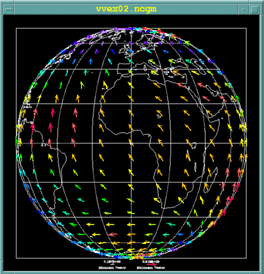
Plotting of 2-dimensional vector fields, the size of the arrow and its orientation are a function of the length and angle of the velocity vector at that point.
Example - vvex02
  ! VVINIT Initialisation d'un tracé de champ de vecteurs
  ! VVECTR Tracé de lignes courants
  ! VVSETx **Définition des paramètres vectors_params

    parameter (mize=21, n=25, iwsize = 2*m*n)
    real u(m,n), v(m,n), wrk(iwsize
    gisize = 2.0*pi/float(m)
    gjsize = 2.0*pi/float(n)
    do j = 1,n
    do  i = 1,m
      u(i,j) = cos(gisize*(float(i)-1.0))   ! Calcul valeurs horizontales
      v(i,j) = cos(gjsize*(float(j)-1.0))   ! et verticales vecteurs u et v
    enddo
    enddo
    idm = 0
    rdm = 0.0
    call vvinit(u,m,v,m,rdm,idm,m,n,rdm,idm)
    call vvectr(u,v,rdm,idm,idm,rdm)    ! Trace des vecteurs
Labels and legends: Labelbar
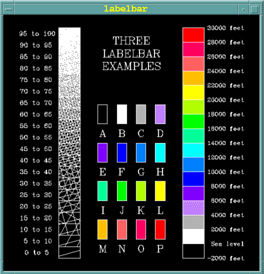
Plotting of labels giving the correspondence between colours and value ranges. The colour filling is done by an NCAR subroutine or a user subroutine.
- LBLBAR Creation of a complete label bar.
- LBFILL Filling of an already created label bar .
- LBSETx Definition of labelbar_params parameters
3D Isosurface: Isosrf
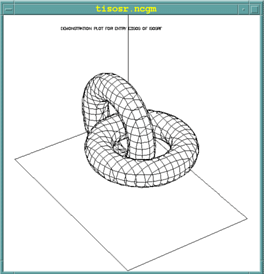
Visualisation of isosurfaces from a 3D array and suppression of hidden lines, ISOSRF constitutes the basic version and ISOSRFHR the high resolution version.
- ISOSRF Plotting of an isosurface
- EZISO Plotting of an isosurface in simplified form
- ISSETx Definition of isosurface_params parameters
3D Surface: Srface
- SRFACE Plotting of a surface in perspective
- ISSETx Definition of parameters described by man surface_params

3D Curve: Threed
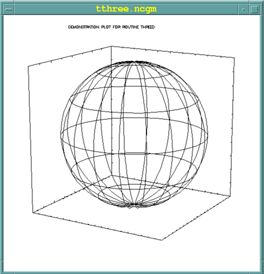
- SET3 Definition of the user space and the viewpoint.
- CURVE3 Plotting of a 3D curve passing through N points.
- LINE3 Plotting of a line passing through 2 points (x1,y1,z1) and (x2,y2,z2).
Colour conversion: Colconv
- COLCONV allows the conversion from one colour representation mode to another. The different types of representations are as follows:
- RGB : Red, Green, Blue used by video screens (additive colour synthesis).
- CMY : Cyan, Magenta, Yellow used by printers (subtractive synthesis).
- HSV : Hue, Saturation,Value (hue, saturation, value)
- HLS: Hue, Lightness, Saturation(hue, brightness, saturation)
- HLSRGB ( H, L, S, R, G, B ) Conversion HLS to RGB.
- HSVRGB ( H, S, V, R, G, B ) Conversion HSV to RGB.
- RGBHLS ( R, G, B, H, L, S ) Conversion RGB to HLS.
- RGBHSV ( R, G, B, H, S, V ) Conversion RGB to HSV.
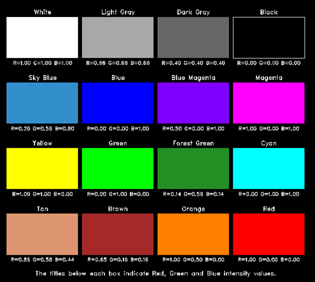
Example coex02
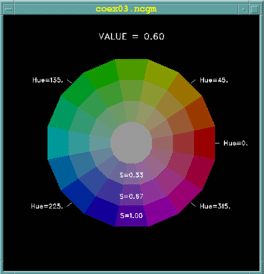
HSV representation (V=0.8)
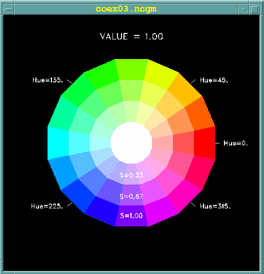
HSV representation (V=1.0)
Usage
NCL program with NCAR GKS
The command ncargf90 allows the compilation and link editing with the NCAR libraries.
- Drivers
- Binary CGM: 1
- X-Window: 8
The procedure ncargex allows the launch of one or more NCAR examples
ncargex [-all, -A] [-allexamples,-E] [-allfundamental,-F] ....
- -n the example is not compiled or executed
- -allexamples generation of all available examples
- -alltests generation of all available tests
The call to ncargex without parameters provides the list of available examples:
      usage: ncargex [-all,-A] [-allexamples,-E] [-alltests,-T]
      [-allfundamental,-F] [-alltutorial,-U] [-allpdocs,-P] [-areas]
      [-autograph] [-bivar] [-colconv] [-conpack] [-conran_family]
      [-conrec_family] [-dashline] [-ezmap] [-field_flow] [-gflash]
      [-gridall] [-halftone] [-histogram] [-isosrfhr] [-isosurface]
      [-labelbar] [-ngmisc] [-plotchar] [-pwrite_family] [-scrolled_title]
      [-softfill] [-spps] [-streamlines] [-surface] [-threed] [-vectors]
      [-gks] [-misc] [-clean] [-n] [-onebyone] names
CGM file visualisation
Idt
Idt is the X-Window product provided by NCAR for the visualisation of CGM files.
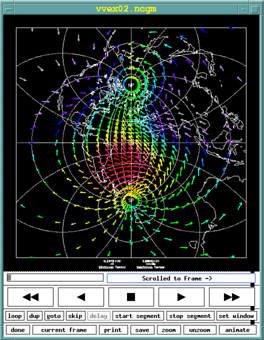
Idt window
Documentation
The NCL documentation is available online: https://www.ncl.ucar.edu/Document/Manuals/NCL_User_Guide/.