Data Parallelism with PyTorch Lightning
This page explains how to distribute an artificial neural network model implemented in PyTorch Lightning code using the data parallelism method.
A practical example is provided as a Notebook at the bottom of the page to give you access to a functional implementation of the explanations below.
Before going further, it is essential to have a basic understanding of PyTorch Lightning usage. The PyTorch Lightning documentation is very comprehensive and provides many examples.
Multi-Process Configuration with Slurm
For multi-node configurations, it is necessary to use the multi-processing managed by Slurm (execution via the Slurm command srun).
For single-node configurations, it is possible to use, as indicated in the PyTorch documentation, torch.multiprocessing.spawn. However, it is possible and more practical to use Slurm multi-processing in all cases, whether single-node or multi-node. This is what we document on this page.
In Slurm, when a script is launched with the srun command, it is automatically distributed across all predefined tasks. For example, if we reserve 4 nodes, requesting 3 GPUs per node, we obtain:
- 4 nodes, indexed from 0 to 3
- 3 GPUs/node indexed from 0 to 2 on each node
- 4 x 3 = 12 processes in total, enabling the execution of 12 tasks with ranks indexed from 0 to 11
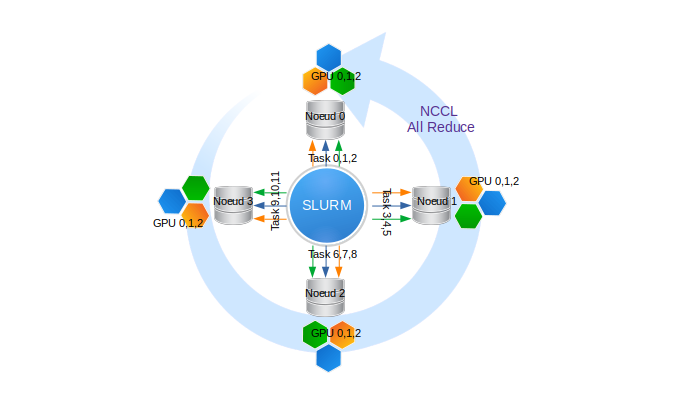
Illustration of a Slurm reservation of 4 nodes and 3 GPUs per node, i.e., 12 processes.
Inter-node collective communications are managed by the NCCL library.
Here are two example Slurm scripts for Jean-Zay:
- For a reservation of N quadri-GPU V100 nodes via the default GPU partition:
#!/bin/bash
#SBATCH --job-name=torch-multi-gpu
#SBATCH --nodes=N              # total number of nodes (N to be defined)
#SBATCH --ntasks-per-node=4    # number of tasks per node (here 4 tasks, i.e., 1 task per GPU)
#SBATCH --gres=gpu:4           # number of GPUs reserved per node (here 4, i.e., all GPUs)
#SBATCH --cpus-per-task=10     # number of cores per task (thus 4x10 = 40 cores, i.e., all cores)
#SBATCH --hint=nomultithread
#SBATCH --time=20:00:00
#SBATCH --output=torch-multi-gpu%j.out
##SBATCH --account=abc@v100

module load pytorch-gpu/py3/2.5.0

srun python myscript.py
- For a reservation of N octo-GPU A100 nodes:
#!/bin/bash
#SBATCH --job-name=torch-multi-gpu
#SBATCH --nodes=N            # total number of nodes (N to be defined)
#SBATCH --ntasks-per-node=8  # number of tasks per node (here 8 tasks, i.e., 1 task per GPU)
#SBATCH --gres=gpu:8         # number of GPUs reserved per node (here 8, i.e., all GPUs)
#SBATCH --cpus-per-task=8    # number of cores per task (thus 8x8 = 64 cores, i.e., all cores)
#SBATCH --hint=nomultithread
#SBATCH --time=20:00:00
#SBATCH --output=torch-multi-gpu%j.out
#SBATCH -C a100
##SBATCH --account=abc@a100

module load arch/a100
module load pytorch-gpu/py3/2.5.0

srun python myscript.py
In both examples, the nodes are reserved exclusively. In particular, this gives us access to all the memory on each node.
PyTorch Lightning Configuration and Distribution Strategy
The multi-GPU training documentation allows you to discover most of the possible configurations and strategies (dp, ddp, ddp_spawn, ddp2, horovod, deepspeed, fairscale, etc.).
On Jean Zay, we recommend using the ddp strategy as it has the fewest restrictions in PyTorch Lightning. It is the same as PyTorch's DistributedDataParallel but through the Lightning wrapper.
Lightning selects the NCCL backend by default. This is the most efficient on Jean Zay, but GLOO and MPI can also be used.
This strategy is managed in the Trainer arguments. Here is an example implementation that directly retrieves Slurm environment variables:
trainer_args = {'accelerator': 'gpu',
                'devices': int(os.environ['SLURM_GPUS_ON_NODE']),
                'num_nodes': int(os.environ['SLURM_NNODES']),
                'strategy': 'ddp'}
trainer = pl.Trainer(**trainer_args)
trainer.fit(model)
The few performance tests conducted on Jean Zay show that the Lightning wrapper, in the best case, results in a time performance loss of around 5% compared to PyTorch's DistributedDataParallel. This order of magnitude is confirmed in Lightning's reference tests. Lightning aims to be a high-level interface, so it is normal to trade some performance for ease of implementation.
Saving and Loading Checkpoints
When using a recent version of Lightning, it is necessary to add
export TMPDIR=$JOBSCRATCH
at the beginning of your submission script to avoid a quota error on the default temporary directory /tmp, which is very small on Jean Zay compute nodes.
Saving
By default, Lightning automatically saves checkpoints.
In multi-GPU mode, Lightning ensures that the save is only performed by the main process. No specific code needs to be added.
trainer = Trainer(strategy="ddp")
model = MyLightningModule(hparams)
trainer.fit(model)
# Saves only on the main process
trainer.save_checkpoint("example.ckpt")
To avoid save conflicts, Lightning recommends always using the save_checkpoint() function. If you use a custom function, remember to decorate it with rank_zero_only().
from pytorch_lightning.utilities import rank_zero_only

@rank_zero_only
def homemade_save_checkpoint(path):
    ...

homemade_save_checkpoint("example.ckpt")
Loading
At the start of training, loading a checkpoint is first performed by the CPU, then the information is sent to the GPU. Again, no specific code needs to be added; Lightning handles everything.
# Import model weights for new training
model = LitModel.load_from_checkpoint(PATH)

# Or restore previous training (model, epoch, step, LR schedulers, apex, etc...)
model = LitModel()
trainer = Trainer()
trainer.fit(model, ckpt_path="some/path/to/my_checkpoint.ckpt")
Distributed Validation
The validation step, executed after each epoch or after a fixed number of training iterations, can be distributed across all GPUs involved in model training. Validation is, by default, distributed in Lightning as soon as you switch to multi-GPU. When data parallelism is used and the validation dataset is substantial, this distributed validation solution across GPUs appears to be the most efficient and fastest.
Here, the challenge is to compute metrics (loss, accuracy, etc.) per batch and per GPU, then weight and average them across the entire validation dataset.
If you use native metrics or those based on torchmetrics, nothing needs to be done.
class MyModel(LightningModule):
    def __init__(self):
        ...
        self.accuracy = torchmetrics.Accuracy()

    def training_step(self, batch, batch_idx):
        x, y = batch
        preds = self(x)
        ...
        # log step metric
        self.accuracy(preds, y)
        self.log("train_acc_step", self.accuracy, on_epoch=True)
        ...
Otherwise, you need to perform synchronisation during logging:
def validation_step(self, batch, batch_idx):
    x, y = batch
    logits = self(x)
    loss = self.loss(logits, y)
    # Add sync_dist=True to sync logging across all GPU workers (may have performance impact)
    self.log("validation_loss", loss, on_step=True, on_epoch=True, sync_dist=True)
def test_step(self, batch, batch_idx):
    x, y = batch
    tensors = self(x)
    return tensors

def test_epoch_end(self, outputs):
    mean = torch.mean(self.all_gather(outputs))

    # When logging only on rank 0, don't forget to add
    # ``rank_zero_only=True`` to avoid deadlocks on synchronization.
    if self.trainer.is_global_zero:
        self.log("my_reduced_metric", mean, rank_zero_only=True)
Application Example
Multi-GPU, Multi-Node Execution with "ddp" in PyTorch Lightning
An example can be found in $DSDIR/examples_IA/Torch_parallel/Example_DataParallelism_PyTorch_Lightning-eng.ipynb on Jean-Zay; it uses the CIFAR database and a ResNet50. The example is a Notebook that allows you to create an execution script. It should be copied to your personal space (ideally in your $WORK).
cp $DSDIR/examples_IA/Torch_parallel/Example_DataParallelism_PyTorch_Lightning-eng.ipynb $WORK
You can then run the Notebook from a Jean Zay frontend machine by selecting a PyTorch kernel (see our documentation on accessing JupyterHub for more information on using Notebooks on Jean Zay).